To view Client Access License (CAL) information, click the CAL button. Each row in the view represents a CAL record.
A CAL is automatically created the first time that a CygNet client on a user’s computer initiates messaging with the ARS. The CAL is marked as Temporary and is valid for 30 days. A temporary CAL does not count against licensed components and there is no limit to the number of temporary CALs; however once the 30 days expires the CAL is disabled. Once the CAL is disabled, CygNet applications can no longer be run from that computer. License Manager must be used to make the temporary CAL Permanent for the client computer to be able to run CygNet applications longer than 30 days.
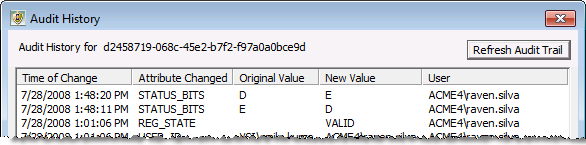
If you are licensed for the Audit Service and the ARS is configured for maximum auditing, audit records for CAL record changes can be viewed in the License Manager utility. See Viewing Audit History for more information.
The Status column in the CAL view shows the status of the CAL. The column may contain more than one status letter. For example, if a temporary license is not made permanent or disabled within 30 days, its status will show as ETX. The status of an enabled, permanent record shows as E.
| Status | Description |
|---|---|
|
E |
The CAL is enabled. |
|
D |
The CAL is disabled. Disabling a CAL is a manual task. A disabled CAL cannot access the CygNet system and does not consume a license. |
|
T |
The CAL is temporary. |
|
X |
The CAL is expired. This applies only to Temporary CALs. |
|
L |
The CAL is locked. A CAL is locked by the ARS when excessive changes are made to two or more of the computer-specific fields (OS Version, Computer Name, or UUID) between uses of CygNet. A locked CAL cannot access the CygNet system and consumes a license. |
|
S |
The CAL is a support seat. Support seats do not consume a license. Support status is given to users who require access to a CygNet installation, but are not permanent users at the site (for example, CygNet Support personnel). |
To Make a CAL Permanent
Or
To Enable a CAL
Or
To Disable a CAL
Or
To Unlock a CAL
To Assign Support Status to a CAL
Changes made to individual CAL records including time of change, attributes changed, attribute values and user IDs, can be viewed in the License Manager utility. In order for CAL record changes to be audited the ARS must be configured for level 2 auditing. See Auditing for more information about configuring auditing.
To View CAL Audit History

|
|
|

